Translate

SQL Server Deafult Port Open For Windows

Sunday, February 25, 2018 Category : 0

For Cmd

@echo ========= SQL Server Ports ===================
@echo Enabling SQLServer default instance port 1433
netsh firewall set portopening TCP 1433 "SQLServer"
@echo Enabling Dedicated Admin Connection port 1434
netsh firewall set portopening TCP 1434 "SQL Admin Connection"
@echo Enabling conventional SQL Server Service Broker port 4022
netsh firewall set portopening TCP 4022 "SQL Service Broker"
@echo Enabling Transact-SQL Debugger/RPC port 135
netsh firewall set portopening TCP 135 "SQL Debugger/RPC"
@echo ========= Analysis Services Ports ==============
@echo Enabling SSAS Default Instance port 2383
netsh firewall set portopening TCP 2383 "Analysis Services"
@echo Enabling SQL Server Browser Service port 2382
netsh firewall set portopening TCP 2382 "SQL Browser"
@echo ========= Misc Applications ==============
@echo Enabling HTTP port 80
netsh firewall set portopening TCP 80 "HTTP"
@echo Enabling SSL port 443
netsh firewall set portopening TCP 443 "SSL"
@echo Enabling port for SQL Server Browser Service's 'Browse' Button
netsh firewall set portopening UDP 1434 "SQL Browser"
@echo Allowing multicast broadcast response on UDP (Browser Service Enumerations OK)
netsh firewall set multicastbroadcastresponse ENABLE

For PowerShell version of the script

Write-host ========= SQL Server Ports ===================

Write-host Enabling SQLServer default instance port 1433

#netsh firewall set portopening TCP 1433 "SQLServer"

New-NetFirewallRule -DisplayName "Allow inbound TCP Port 1433" –Direction inbound –LocalPort 1433 -Protocol TCP -Action Allow

New-NetFirewallRule -DisplayName "Allow outbound TCP Port 1433" –Direction outbound –LocalPort 1433 -Protocol TCP -Action Allow

Write-host Enabling Dedicated Admin Connection port 1434

#netsh firewall set portopening TCP 1434 "SQL Admin Connection"

New-NetFirewallRule -DisplayName "Allow inbound TCP Port 1434" -Direction inbound –LocalPort 1434 -Protocol TCP -Action Allow

New-NetFirewallRule -DisplayName "Allow outbound TCP Port 1434" -Direction outbound –LocalPort 1434 -Protocol TCP -Action Allow

Write-host Enabling conventional SQL Server Service Broker port 4022

#netsh firewall set portopening TCP 4022 "SQL Service Broker"

New-NetFirewallRule -DisplayName "Allow inbound TCP Port 4022" -Direction inbound –LocalPort 4022 -Protocol TCP -Action Allow

New-NetFirewallRule -DisplayName "Allow outbound TCP Port 4022" -Direction outbound –LocalPort 4022 -Protocol TCP -Action Allow

Write-host Enabling Transact-SQL Debugger/RPC port 135

#netsh firewall set portopening TCP 135 "SQL Debugger/RPC"

New-NetFirewallRule -DisplayName "Allow inbound TCP Port 135" -Direction inbound –LocalPort 135 -Protocol TCP -Action Allow

New-NetFirewallRule -DisplayName "Allow outbound TCP Port 135" -Direction outbound –LocalPort 135 -Protocol TCP -Action Allow

Write-host ========= Analysis Services Ports ==============

Write-host Enabling SSAS Default Instance port 2383

#netsh firewall set portopening TCP 2383 "Analysis Services"

New-NetFirewallRule -DisplayName "Allow inbound TCP Port 2383" -Direction inbound –LocalPort 2383 -Protocol TCP -Action Allow

New-NetFirewallRule -DisplayName "Allow outbound TCP Port 2383" -Direction outbound –LocalPort 2383 -Protocol TCP -Action Allow

Write-host Enabling SQL Server Browser Service port 2382

#netsh firewall set portopening TCP 2382 "SQL Browser"

New-NetFirewallRule -DisplayName "Allow inbound TCP Port 2382" -Direction inbound –LocalPort 2382 -Protocol TCP -Action Allow

New-NetFirewallRule -DisplayName "Allow outbound TCP Port 2382" -Direction outbound –LocalPort 2382 -Protocol TCP -Action Allow

Write-host ========= Misc Applications ==============

Write-host Enabling HTTP port 80

#netsh firewall set portopening TCP 80 "HTTP"

New-NetFirewallRule -DisplayName "Allow inbound TCP Port 80" -Direction inbound –LocalPort 80 -Protocol TCP -Action Allow

New-NetFirewallRule -DisplayName "Allow outbound TCP Port 80" -Direction outbound –LocalPort 80 -Protocol TCP -Action Allow

Write-host Enabling SSL port 443

#netsh firewall set portopening TCP 443 "SSL"

New-NetFirewallRule -DisplayName "Allow inbound TCP Port 443" -Direction inbound –LocalPort 443 -Protocol TCP -Action Allow

New-NetFirewallRule -DisplayName "Allow outbound TCP Port 443" -Direction outbound –LocalPort 443 -Protocol TCP -Action Allow

Write-host Enabling port for SQL Server Browser Service's 'Browse

#netsh firewall set portopening UDP 1434 "SQL Browser"

New-NetFirewallRule -DisplayName "Allow inbound UDP Port 1434" -Direction inbound –LocalPort 1434 -Protocol UDP -Action Allow

New-NetFirewallRule -DisplayName "Allow outbound UDP Port 1434" -Direction outbound –LocalPort 1434 -Protocol UDP -Action Allow


If Both SQL 2008 & SQL 2014 , OR Any Different two or more version. Then remote pc browse
only work for one version. then we need to manually add port settings for one or more sql tcp port.

Shown in below Screen shot .


in my case Port is default set for sql 2008

 
Then i have set manually port for sql 14 and add  to the firewall exception.

@echo Enabling SQLServer default instance port 1533
netsh firewall set portopening TCP 1533 "SQLServer"


C# HttpWebRequest FormData post and return Json

Wednesday, January 24, 2018 Category : , 0


        public static Result POSTFormData(string url, string identifier, string FormData)
        {
            // Setup the POST data
            //string poststring = String.Format("qrCodeData=90320388203195564382");
            Result result = new Result();
            try
            {

                HttpWebRequest httpRequest = (HttpWebRequest)WebRequest.Create(url);

                httpRequest.Method = "POST";
                httpRequest.ContentType = "application/x-www-form-urlencoded";
                httpRequest.Headers.Add("secret", identifier);


                // Convert the post string to a byte array
                byte[] bytedata = System.Text.Encoding.UTF8.GetBytes(FormData);
                httpRequest.ContentLength = bytedata.Length;

                // Create the stream
                Stream requestStream = httpRequest.GetRequestStream();
                requestStream.Write(bytedata, 0, bytedata.Length);
                requestStream.Close();

                // Get the response from remote server
                HttpWebResponse httpWebResponse = (HttpWebResponse)httpRequest.GetResponse();
                Stream responseStream = httpWebResponse.GetResponseStream();

                System.Text.StringBuilder sb = new System.Text.StringBuilder();
                using (StreamReader reader = new StreamReader(responseStream, System.Text.Encoding.UTF8))
                {
                    string line;
                    while ((line = reader.ReadLine()) != null)
                    {
                        sb.Append(line);
                    }
                }

                result.ResultState = true;
                result.JsonString = sb.ToString();

            }
            catch (Exception ex)
            {
                result.ResultState = false;
                result.SqlError = ex.Message;
            }

            return result;
        }


            object theImg = dt.Rows[0]["Picture"];
if (!DBNull.Equals(theImg, DBNull.Value) && ((byte[])theImg).Length > 0)
            {
                 pictureBox1.BackgroundImage = new ImageHelper().ByteToImage((byte[])theImg);
}

C# Image , Byte , URL To Image Convert

Category : 0

    public class ImageHelper
    {
        public byte[] ImageToByte(Image imageIn)
        {

            MemoryStream ms = new MemoryStream();
            imageIn.Save(ms, System.Drawing.Imaging.ImageFormat.Jpeg);
            return ms.ToArray();
        }

        public Image ByteToImage(byte[] byteArrayIn)
        {
            MemoryStream ms = new MemoryStream(byteArrayIn);
            Image returnImage = Image.FromStream(ms);
            return returnImage;
        }

        public Image GenerateThumbnailImage(string imgUrl)
        {
            Image imgThumb = null;
            try
            {
                Image image = null;
                if (imgUrl != String.Empty)
                    image = Image.FromFile(imgUrl);

                if (image != null)
                {
                    imgThumb = image.GetThumbnailImage(130, 170, null, new IntPtr());
                    //this.Refresh();
                }
                return imgThumb;
            }
            catch
            {              
                return imgThumb;
            }
        }

    }

SQL Store Procedure To Class Wrapper

Wednesday, January 3, 2018 Category : 0


DECLARE @sql NVARCHAR(MAX) = N'EXEC ShopMenu_GermanClub.dbo.SP_ReportRM_PO_Challan ww,admin,Y;';

--SELECT name, system_type_name
--    FROM sys.dm_exec_describe_first_result_set(@sql, NULL, 1) AS col


declare @TableName sysname = 'SP_ReportRM_PO_Challan'
declare @Result varchar(max) = 'public class ' + @TableName + '
{'

select @Result = @Result + '
    public ' + ColumnType + NullableSign + ' ' + ColumnName + ' { get; set; }
'
from
(
    select
        replace(col.name, ' ', '_') ColumnName,
       
        case --col.system_type_name
            WHEN (CHARINDEX('nvarchar',system_type_name)>0) then 'string'
            when (system_type_name='bigint') then 'long'
            when (system_type_name='binary') then 'byte[]'
            when (system_type_name='bit') then 'bool'
            when (system_type_name='char') then 'string'
            when (system_type_name='date') then 'DateTime'
            when (system_type_name='datetime') then 'DateTime'
            when (system_type_name='datetime2') then 'DateTime'
            when (system_type_name='datetimeoffset') then 'DateTimeOffset'
            when (CHARINDEX('decimal',system_type_name)>0) then 'decimal'
            when (system_type_name='float') then 'float'
            when (system_type_name='image') then 'byte[]'
            when (system_type_name='int') then 'int'
            when (system_type_name='money') then 'decimal'
            when (system_type_name='nchar') then 'string'
            when (system_type_name='ntext') then 'string'
            when (CHARINDEX('numeric',system_type_name)>0) then 'decimal'
            when (system_type_name='real') then 'double'
            when (system_type_name='smalldatetime') then 'DateTime'
            when (system_type_name='smallint') then 'short'
            when (system_type_name='smallmoney') then 'decimal'
            when (system_type_name='text') THEN 'string'
            when (system_type_name='time') then 'TimeSpan'
            when (system_type_name='timestamp') then 'DateTime'
            when (system_type_name='tinyint') then 'byte'
            when (system_type_name='uniqueidentifier') then 'Guid'
            when (system_type_name='varbinary') then 'byte[]'
            when (system_type_name='varchar') then 'string'
            ELSE ('UNKNOWN_') + col.system_type_name
        end ColumnType,
        case
            when col.is_nullable = 1 and col.name in ('bigint', 'bit', 'date', 'datetime', 'datetime2', 'datetimeoffset', 'decimal', 'float', 'int', 'money', 'numeric', 'real', 'smalldatetime', 'smallint', 'smallmoney', 'time', 'tinyint', 'uniqueidentifier')
            then '?'
            else ''
        end NullableSign
    -- name, system_type_name
    FROM sys.dm_exec_describe_first_result_set(@sql, NULL, 1) AS col

) t
--order by ColumnId

set @Result = @Result  + '
}'

print @Result

DataTable to C# Class List Converter

Monday, December 25, 2017 Category : , , 0

  public static List<T> DataTableToList<T>(this DataTable table) where T : class, new()
        {
            try
            {
                List<T> list = new List<T>();

                foreach (var row in table.AsEnumerable())
                {
                    T obj = new T();

                    foreach (var prop in obj.GetType().GetProperties())
                    {
                        try
                        {
                            PropertyInfo propertyInfo = obj.GetType().GetProperty(prop.Name);

                            var value = row[prop.Name];
                            if (value == DBNull.Value)
                            {
                                value = null;
                            }
                            //propertyInfo.SetValue(obj, Convert.ChangeType(row[prop.Name], propertyInfo.PropertyType), null);
                            prop.SetValue(obj, value, null);
                        }
                        catch
                        {
                            continue;
                        }
                    }

                    list.Add(obj);
                }

                return list;
            }
            catch
            {
                return null;
            }
        }

Generate class from database table

Sunday, November 19, 2017 Category : 0

https://stackoverflow.com/questions/5873170/generate-class-from-database-table


declare @TableName sysname = 'TableName'
declare @Result varchar(max) = 'public class ' + @TableName + '
{'

select @Result = @Result + '
    public ' + ColumnType + NullableSign + ' ' + ColumnName + ' { get; set; }
'
from
(
    select 
        replace(col.name, ' ', '_') ColumnName,
        column_id ColumnId,
        case typ.name 
            when 'bigint' then 'long'
            when 'binary' then 'byte[]'
            when 'bit' then 'bool'
            when 'char' then 'string'
            when 'date' then 'DateTime'
            when 'datetime' then 'DateTime'
            when 'datetime2' then 'DateTime'
            when 'datetimeoffset' then 'DateTimeOffset'
            when 'decimal' then 'decimal'
            when 'float' then 'float'
            when 'image' then 'byte[]'
            when 'int' then 'int'
            when 'money' then 'decimal'
            when 'nchar' then 'string'
            when 'ntext' then 'string'
            when 'numeric' then 'decimal'
            when 'nvarchar' then 'string'
            when 'real' then 'double'
            when 'smalldatetime' then 'DateTime'
            when 'smallint' then 'short'
            when 'smallmoney' then 'decimal'
            when 'text' then 'string'
            when 'time' then 'TimeSpan'
            when 'timestamp' then 'DateTime'
            when 'tinyint' then 'byte'
            when 'uniqueidentifier' then 'Guid'
            when 'varbinary' then 'byte[]'
            when 'varchar' then 'string'
            else 'UNKNOWN_' + typ.name
        end ColumnType,
        case 
            when col.is_nullable = 1 and typ.name in ('bigint', 'bit', 'date', 'datetime', 'datetime2', 'datetimeoffset', 'decimal', 'float', 'int', 'money', 'numeric', 'real', 'smalldatetime', 'smallint', 'smallmoney', 'time', 'tinyint', 'uniqueidentifier') 
            then '?' 
            else '' 
        end NullableSign
    from sys.columns col
        join sys.types typ on
            col.system_type_id = typ.system_type_id AND col.user_type_id = typ.user_type_id
    where object_id = object_id(@TableName)
) t
order by ColumnId

set @Result = @Result  + '
}'

print @Result

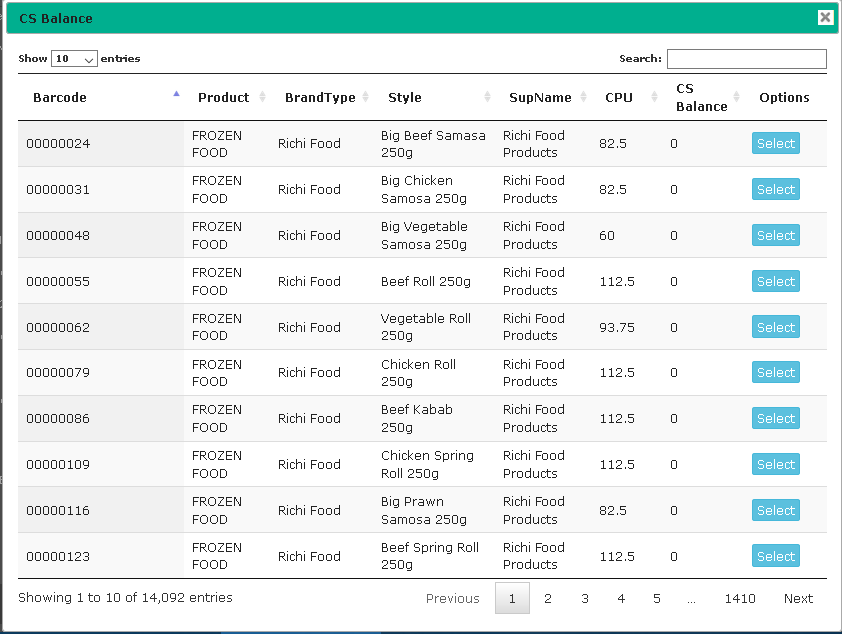
ASP.NET MVC , Datatables custom paging

Tuesday, October 3, 2017 Category : , 1

By default datatables load all record from database and then use search in client side. but it often cause problem in large data set, to load from database.

So i implement custom paging and searching using jqery Bootpag pagination
https://codepen.io/SitePoint/pen/jBWOMX

 HTML

 <div class="col-md-4">
        <input type="text" class="form-control" style="float:left;"
               placeholder="Search Style size,Barcode,Product" id="myInputTextField">
    </div>
    <div class="col-md-12" style="margin-top: -10px;">
        <div class="table-responsive" style="margin-top: 0px;">
            <table id="dlWarehouseStock" class="display" cellspacing="0" width="100%">
                <thead>
                    <tr>
                        <th>Barcode</th>
                        <th>Product</th>
                        <th>BrandType</th>
                        <th>Style</th>
                        <th>SupName</th>
                        <th>CPU</th>
                        <th>CS Balance</th>
                        <th>Options</th>
                    </tr>
                </thead>
            </table>
        </div>
    </div>

 JQeruy

$(document).ready(function () {


    $('#pagination-here').on("page", function (event, num) {
        //show / hide content or pull via ajax etc
        $("#content").html("Page " + num);
        LoadCentralStockAll("", num, $('#myInputTextField').val());
    });

    $("#myInputTextField").keypress(function (e) {
        if (e.keyCode == 13) {
            if ($('#myInputTextField').val().length == 0) {
                GetTotalNumberOfStyleSize($('#myInputTextField').val());
                LoadCentralStockAll("", 1, "");
            } else {
                debugger;
                GetTotalNumberOfStyleSize($('#myInputTextField').val());
                LoadCentralStockAll("", 1, $('#myInputTextField').val());
            }
        }
    });

});


function LoadCentralStockAll(parameter, pageNumber, searchText) {
    if ($.fn.dataTable.isDataTable('#dlWarehouseStock')) {
        var tables = $('#dlWarehouseStock').DataTable();
        tables.destroy();
    }
    $('#dlWarehouseStock').dataTable({
        "processing": true,
        'paging': false,
        "bLengthChange": false,
        "info": false,
        //"ajax": url + "Process/GetCentralStockByType?Type=" + parameter,
        "ajax": url + "Setup/GetAllstyleSizeBySupIDWithPagination?pageNumber=" + pageNumber + "&searchText=" + searchText + "&stockType=NonZero",
        "columns": [
            { "data": "Barcode" },
            { "data": "PrdName" },
            { "data": "BTName" },
            { "data": "SSName" },
            { "data": "SupName" },
            { "data": "CPU" },
            { "data": "BalQty" },
           {
               "mData": null,
               "bSortable": false,
               "mRender": function (data, type, full) {
                   return '';
               }
           }
        ]
    });
}


function GetTotalNumberOfStyleSize(searchText) {
    $.ajax({
        url: url + 'Setup/GetTotalNumberOfStyleSize',
        data: { 'stockType': 'All', 'searchText': searchText },
        success: function (data) {
            console.log("Total no.");
            console.log(data.data[0].TotalNoOfBarcode);
            var paginationSize = parseInt(data.data[0].TotalNoOfBarcode) / 10;
            if (paginationSize < 1) {
                paginationSize = 1;
            }
            if (data.data.length) {
                $('#pagination-here').bootpag({
                    total: Math.round(paginationSize),
                    page: 1,
                    maxVisible: 5,
                    leaps: true,
                    firstLastUse: true,
                    first: '←',
                    last: '→',
                    wrapClass: 'pagination',
                    activeClass: 'active',
                    disabledClass: 'disabled',
                    nextClass: 'next',
                    prevClass: 'prev',
                    lastClass: 'last',
                    firstClass: 'first'
                });
            } else {
                alert("Invalid !");
            }
        },
        error: function () {
            alert('An error occured try again later');
        }
    });
} 
 

Powered by Blogger.