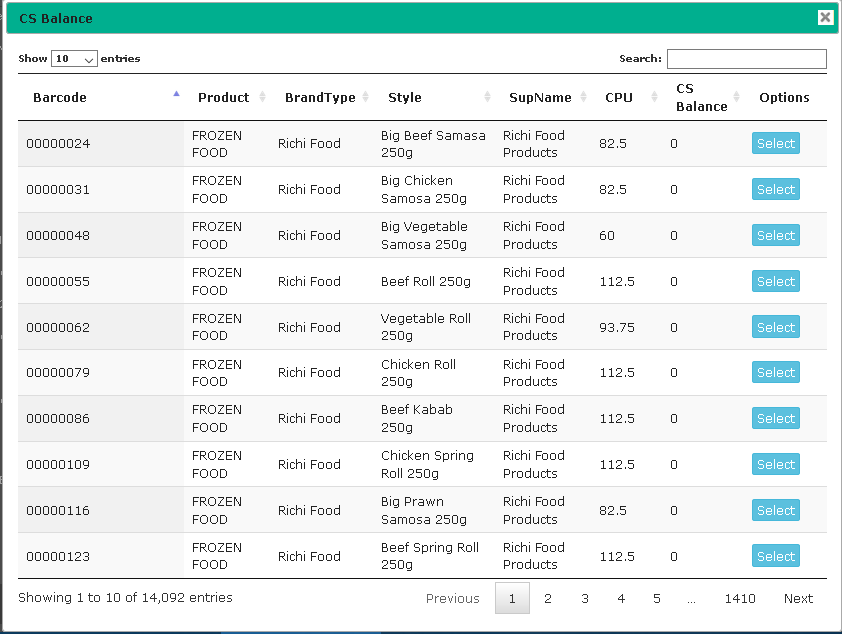
By default datatables load all record from database and then use search in client side. but it often cause problem in large data set, to load from database.
Problem Arise when use to set image source using javascript , then after publish in IIS sub directory image is not loaded, for hosting directory miss match. then we can catch the hosting directory , and append to image source.
var dd = '<% =Request.ApplicationPath %>';
console.log(dd);
During Save operation use file object as byte array and save to database.
for easy save use entity framework .
where i have select datatype for sql server is varbinary(MAX).
View File to user
private void ViewDocument(Label lblloc, string fileName)
        {
            try
            {
                if (file == null)
                {
                    MessageBox.Show("No file for view");
                    return;
                }

                SaveFileDialog savefile = new SaveFileDialog();
                // set a default file name
                savefile.FileName = fileName + ext;
                // set filters - this can be done in properties as well
                savefile.Filter = "All files (*.*)|*.*";

                if (savefile.ShowDialog() == DialogResult.OK)
                {
                    // using (StreamWriter sw = new StreamWriter(savefile.FileName))
                    //      sw.WriteLine("Hello World!");

                    ByteArrayToFile(savefile.FileName, file as byte[]);
                }
            }
            catch (Exception ex)
            {
                MessageBox.Show(ex.Message);
            }
        }


  public bool ByteArrayToFile(string _FileName, byte[] _ByteArray)
        {
            try
            {
                // Open file for reading
                System.IO.FileStream _FileStream =
                   new System.IO.FileStream(_FileName, System.IO.FileMode.Create,
                                            System.IO.FileAccess.Write);
                // Writes a block of bytes to this stream using data from
                // a byte array.
                _FileStream.Write(_ByteArray, 0, _ByteArray.Length);

                // close file stream
                _FileStream.Close();

                return true;
            }
            catch (Exception _Exception)
            {
                // Error
                Console.WriteLine("Exception caught in process: {0}",
                                  _Exception.ToString());
            }

            // error occured, return false
            return false;
        }
public void ExportDataTable(DataTable table, string destination)
        {
            using (var workbook = SpreadsheetDocument.Create(destination, DocumentFormat.OpenXml.SpreadsheetDocumentType.Workbook))
            {
                var workbookPart = workbook.AddWorkbookPart();

                workbook.WorkbookPart.Workbook = new DocumentFormat.OpenXml.Spreadsheet.Workbook();

                workbook.WorkbookPart.Workbook.Sheets = new DocumentFormat.OpenXml.Spreadsheet.Sheets();

                //foreach (System.Data.DataTable table in ds.Tables)
               // {

                    var sheetPart = workbook.WorkbookPart.AddNewPart();
                    var sheetData = new DocumentFormat.OpenXml.Spreadsheet.SheetData();
                    sheetPart.Worksheet = new DocumentFormat.OpenXml.Spreadsheet.Worksheet(sheetData);

                    DocumentFormat.OpenXml.Spreadsheet.Sheets sheets = workbook.WorkbookPart.Workbook.GetFirstChild();
                    string relationshipId = workbook.WorkbookPart.GetIdOfPart(sheetPart);

                    uint sheetId = 1;
                    if (sheets.Elements().Count() > 0)
                    {
                        sheetId =
                            sheets.Elements().Select(s => s.SheetId.Value).Max() + 1;
                    }

                    DocumentFormat.OpenXml.Spreadsheet.Sheet sheet = new DocumentFormat.OpenXml.Spreadsheet.Sheet() { Id = relationshipId, SheetId = sheetId, Name = table.TableName };
                    sheets.Append(sheet);

                    DocumentFormat.OpenXml.Spreadsheet.Row headerRow = new DocumentFormat.OpenXml.Spreadsheet.Row();

                    List columns = new List();
                    foreach (System.Data.DataColumn column in table.Columns)
                    {
                        columns.Add(column.ColumnName);

                        DocumentFormat.OpenXml.Spreadsheet.Cell cell = new DocumentFormat.OpenXml.Spreadsheet.Cell();
                        cell.DataType = DocumentFormat.OpenXml.Spreadsheet.CellValues.String;
                        cell.CellValue = new DocumentFormat.OpenXml.Spreadsheet.CellValue(column.ColumnName);
                        headerRow.AppendChild(cell);
                    }


                    sheetData.AppendChild(headerRow);

                    foreach (System.Data.DataRow dsrow in table.Rows)
                    {
                        DocumentFormat.OpenXml.Spreadsheet.Row newRow = new DocumentFormat.OpenXml.Spreadsheet.Row();
                        foreach (String col in columns)
                        {
                            DocumentFormat.OpenXml.Spreadsheet.Cell cell = new DocumentFormat.OpenXml.Spreadsheet.Cell();
                            cell.DataType = DocumentFormat.OpenXml.Spreadsheet.CellValues.String;
                            cell.CellValue = new DocumentFormat.OpenXml.Spreadsheet.CellValue(dsrow[col].ToString()); //
                            newRow.AppendChild(cell);
                        }

                        sheetData.AppendChild(newRow);
                    }

                //}
            }
        }
Read Excel File
     public static DataSet ExtractExcelSheetValuesToDataTable(string xlsxFilePath, string sheetName)
        {
            DataTable dt = new DataTable();
            DataSet ds = new DataSet();
            using (SpreadsheetDocument myWorkbook = SpreadsheetDocument.Open(xlsxFilePath, true))
            {
                //Access the main Workbook part, which contains data
                WorkbookPart workbookPart = myWorkbook.WorkbookPart;
                WorksheetPart worksheetPart = null;
                if (!string.IsNullOrEmpty(sheetName))
                {
                    Sheet ss = workbookPart.Workbook.Descendants().Where(s => s.Name == sheetName).FirstOrDefault();
                    if(ss == null)
                    {
                        throw new Exception("Sheet name not mathced");
                    }
                    worksheetPart = (WorksheetPart)workbookPart.GetPartById(ss.Id);
                }
                else
                {
                    worksheetPart = workbookPart.WorksheetParts.FirstOrDefault();
                }
                SharedStringTablePart stringTablePart = workbookPart.SharedStringTablePart;
                if (worksheetPart != null)
                {
                    Row lastRow = worksheetPart.Worksheet.Descendants().LastOrDefault();
                    Row firstRow = worksheetPart.Worksheet.Descendants().FirstOrDefault();
                    if (firstRow != null)
                    {
                        foreach (Cell c in firstRow.ChildElements)
                        {
                            string value = GetValue(c, stringTablePart);
                            dt.Columns.Add(value);
                        }
                    }
                    if (lastRow != null)
                    {
                        for (int i = 2; i <= lastRow.RowIndex; i++)
                        {
                            DataRow dr = dt.NewRow();
                            bool empty = true;
                            Row row = worksheetPart.Worksheet.Descendants().Where(r => i == r.RowIndex).FirstOrDefault();
                            int j = 0;
                            if (row != null)
                            {
                                foreach (Cell c in row.Descendants())
                                {
                                    int? colIndex = GetColumnIndex(((DocumentFormat.OpenXml.Spreadsheet.CellType)(c)).CellReference);
                                    if (colIndex > j)
                                    {
                                        dr[j] = "";
                                        j++;
                                    }

                                    if(j == 21)
                                    {
                                        // only for checking
                                    }
                                    //Get cell value
                                    string value = "";
                                   // if (c.ElementAt(0).Count() >0)
                                      //  value=  c.CellValue.Text;
                                     value = GetValue(c, stringTablePart);
                                    //if (!string.IsNullOrEmpty(value))
                                    //    empty = false;
                                    dr[j] = value;
                                    j++;
                                    if (j == dt.Columns.Count)
                                        break;
                                }

                                //foreach (Cell c in row.ChildElements)
                                //{
                                //    //Get cell value
                                //    string value = GetValue(c, stringTablePart);
                                //    //if (!string.IsNullOrEmpty(value))
                                //    //    empty = false;
                                //    dr[j] = value;
                                //    j++;
                                //    if (j == dt.Columns.Count)
                                //        break;
                                //}
                                //if (empty)
                                //    break;
                                dt.Rows.Add(dr);
                            }
                        }
                    }
                }
            }
            ds.Tables.Add(dt);
            return ds;
        }

        public static string GetValue(Cell cell, SharedStringTablePart stringTablePart)
        {
            if (cell.ChildElements.Count == 0) return null;
            //get cell value
            string value = cell.ElementAt(0).InnerText;//CellValue.InnerText;
            //Look up real value from shared string table
            if ((cell.DataType != null) && (cell.DataType == CellValues.SharedString))
                value = stringTablePart.SharedStringTable.ChildElements[Int32.Parse(value)].InnerText;
            return value;

        }

        private static int? GetColumnIndex(string cellReference)
        {
            if (string.IsNullOrEmpty(cellReference))
            {
                return null;
            }

            //remove digits
            string columnReference = Regex.Replace(cellReference.ToUpper(), @"[\d]", string.Empty);

            int columnNumber = -1;
            int mulitplier = 1;

            //working from the end of the letters take the ASCII code less 64 (so A = 1, B =2...etc)
            //then multiply that number by our multiplier (which starts at 1)
            //multiply our multiplier by 26 as there are 26 letters
            foreach (char c in columnReference.ToCharArray().Reverse())
            {
                columnNumber += mulitplier * ((int)c - 64);

                mulitplier = mulitplier * 26;
            }

            //the result is zero based so return columnnumber + 1 for a 1 based answer
            //this will match Excel's COLUMN function
            return columnNumber;
        }