Translate

Home > ASP.NET MVC

ASP.NET MVC

The target "GatherAllFilesToPublish" does not exist in the project.

Sunday, June 28, 2020 Category : , 0

I fixed the issue by doing following modifications to the Project file. have VS 2012 and the web application was MVC 4

1. Unload the project and start editing the csproj file.

2. Added following lines.

<PropertyGroup>
    <VisualStudioVersion Condition="'$(VisualStudioVersion)' == ''">10.0</VisualStudioVersion>
    <VSToolsPath Condition="'$(VSToolsPath)' == ''">$(MSBuildExtensionsPath32)\Microsoft\VisualStudio\v$(VisualStudioVersion)</VSToolsPath>
 </PropertyGroup>

3. Added following lines.(Note that some of the Import statments may already exisits. In such case you do not need to add them.

 <Import Project="$(MSBuildBinPath)\Microsoft.CSharp.targets" />
  <Import Project="$(VSToolsPath)\WebApplications\Microsoft.WebApplication.targets" Condition="'$(VSToolsPath)' != ''" />
  <Import Project="$(MSBuildExtensionsPath32)\Microsoft\VisualStudio\v10.0\WebApplications\Microsoft.WebApplication.targets" Condition="false" />


Source : https://forums.asp.net/t/1838524.aspx?The+target+GatherAllFilesToPublish+does+not+exist

Answer by :  dilanh

DataTable to C# Class List Converter

Monday, December 25, 2017 Category : , , 0

  public static List<T> DataTableToList<T>(this DataTable table) where T : class, new()
        {
            try
            {
                List<T> list = new List<T>();

                foreach (var row in table.AsEnumerable())
                {
                    T obj = new T();

                    foreach (var prop in obj.GetType().GetProperties())
                    {
                        try
                        {
                            PropertyInfo propertyInfo = obj.GetType().GetProperty(prop.Name);

                            var value = row[prop.Name];
                            if (value == DBNull.Value)
                            {
                                value = null;
                            }
                            //propertyInfo.SetValue(obj, Convert.ChangeType(row[prop.Name], propertyInfo.PropertyType), null);
                            prop.SetValue(obj, value, null);
                        }
                        catch
                        {
                            continue;
                        }
                    }

                    list.Add(obj);
                }

                return list;
            }
            catch
            {
                return null;
            }
        }

ASP.NET MVC , Datatables custom paging

Tuesday, October 3, 2017 Category : , 1

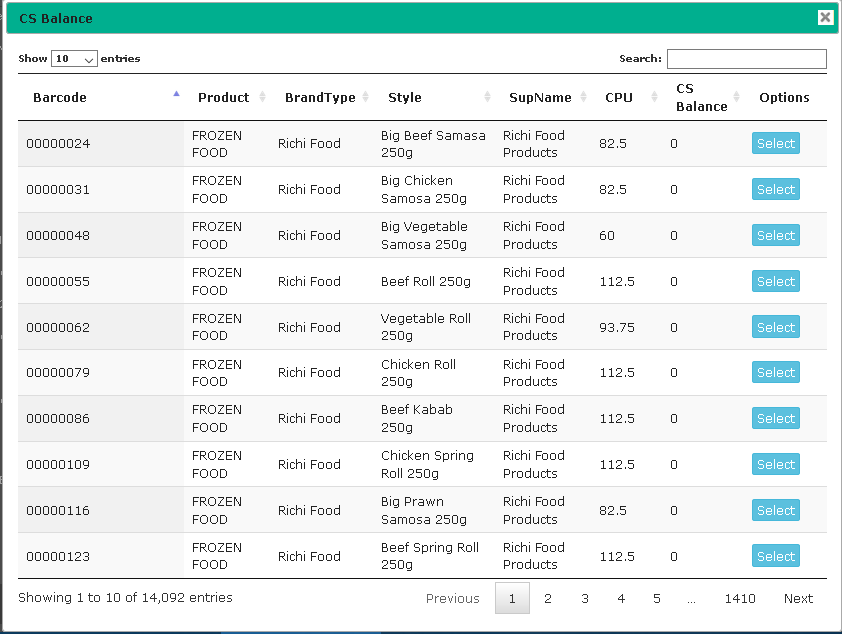
By default datatables load all record from database and then use search in client side. but it often cause problem in large data set, to load from database.

So i implement custom paging and searching using jqery Bootpag pagination
https://codepen.io/SitePoint/pen/jBWOMX

 HTML

 <div class="col-md-4">
        <input type="text" class="form-control" style="float:left;"
               placeholder="Search Style size,Barcode,Product" id="myInputTextField">
    </div>
    <div class="col-md-12" style="margin-top: -10px;">
        <div class="table-responsive" style="margin-top: 0px;">
            <table id="dlWarehouseStock" class="display" cellspacing="0" width="100%">
                <thead>
                    <tr>
                        <th>Barcode</th>
                        <th>Product</th>
                        <th>BrandType</th>
                        <th>Style</th>
                        <th>SupName</th>
                        <th>CPU</th>
                        <th>CS Balance</th>
                        <th>Options</th>
                    </tr>
                </thead>
            </table>
        </div>
    </div>

 JQeruy

$(document).ready(function () {


    $('#pagination-here').on("page", function (event, num) {
        //show / hide content or pull via ajax etc
        $("#content").html("Page " + num);
        LoadCentralStockAll("", num, $('#myInputTextField').val());
    });

    $("#myInputTextField").keypress(function (e) {
        if (e.keyCode == 13) {
            if ($('#myInputTextField').val().length == 0) {
                GetTotalNumberOfStyleSize($('#myInputTextField').val());
                LoadCentralStockAll("", 1, "");
            } else {
                debugger;
                GetTotalNumberOfStyleSize($('#myInputTextField').val());
                LoadCentralStockAll("", 1, $('#myInputTextField').val());
            }
        }
    });

});


function LoadCentralStockAll(parameter, pageNumber, searchText) {
    if ($.fn.dataTable.isDataTable('#dlWarehouseStock')) {
        var tables = $('#dlWarehouseStock').DataTable();
        tables.destroy();
    }
    $('#dlWarehouseStock').dataTable({
        "processing": true,
        'paging': false,
        "bLengthChange": false,
        "info": false,
        //"ajax": url + "Process/GetCentralStockByType?Type=" + parameter,
        "ajax": url + "Setup/GetAllstyleSizeBySupIDWithPagination?pageNumber=" + pageNumber + "&searchText=" + searchText + "&stockType=NonZero",
        "columns": [
            { "data": "Barcode" },
            { "data": "PrdName" },
            { "data": "BTName" },
            { "data": "SSName" },
            { "data": "SupName" },
            { "data": "CPU" },
            { "data": "BalQty" },
           {
               "mData": null,
               "bSortable": false,
               "mRender": function (data, type, full) {
                   return '';
               }
           }
        ]
    });
}


function GetTotalNumberOfStyleSize(searchText) {
    $.ajax({
        url: url + 'Setup/GetTotalNumberOfStyleSize',
        data: { 'stockType': 'All', 'searchText': searchText },
        success: function (data) {
            console.log("Total no.");
            console.log(data.data[0].TotalNoOfBarcode);
            var paginationSize = parseInt(data.data[0].TotalNoOfBarcode) / 10;
            if (paginationSize < 1) {
                paginationSize = 1;
            }
            if (data.data.length) {
                $('#pagination-here').bootpag({
                    total: Math.round(paginationSize),
                    page: 1,
                    maxVisible: 5,
                    leaps: true,
                    firstLastUse: true,
                    first: '←',
                    last: '→',
                    wrapClass: 'pagination',
                    activeClass: 'active',
                    disabledClass: 'disabled',
                    nextClass: 'next',
                    prevClass: 'prev',
                    lastClass: 'last',
                    firstClass: 'first'
                });
            } else {
                alert("Invalid !");
            }
        },
        error: function () {
            alert('An error occured try again later');
        }
    });
} 
 

HTML FileBrowser Image Preview

Wednesday, February 3, 2016 Category : , , 0


HTML


<div class="form-group">
                                <label class="control-label col-md-3" for="inputWarning"> Image 1 </label>
                                <div class="col-md-4">
                                    <input id="exampleInputFile1" name="ImagePath" type="file">
                                    <b>Live Preview</b>
                                    <br />
                                    <div id="dvPreview1">
                                    </div>
                                </div>
                            </div>


Java Script


  window.onload = function () {

        LoadTempData();

        var fileBrowser = document.getElementById("exampleInputFile1");
        fileBrowser.onchange = function () {
            LoadImage('1', fileBrowser);
        }


        var fileBrowser2 = document.getElementById("exampleInputFile2");
        fileBrowser2.onchange = function () {
            LoadImage('2', fileBrowser2);
        }


        var fileBrowser3 = document.getElementById("exampleInputFile3");
        fileBrowser3.onchange = function () {
            LoadImage('3', fileBrowser3);
        }

        var fileBrowser4 = document.getElementById("exampleInputFile4");
        fileBrowser4.onchange = function () {
            LoadImage('4', fileBrowser4);
        }


        var fileBrowser5 = document.getElementById("exampleInputFile5");
        fileBrowser5.onchange = function () {
            LoadImage('5', fileBrowser5);
        }

    };


function LoadImage(idNo, fileBrowser)
    {

        if (typeof (FileReader) != "undefined") {
            var dvPreview = document.getElementById("dvPreview" + idNo);
            dvPreview.innerHTML = "";
            var regex = /^([a-zA-Z0-9\s_\\.\-:])+(.jpg|.jpeg|.gif|.png|.bmp)$/;
            for (var i = 0; i < fileBrowser.files.length; i++) {
                var file = fileBrowser.files[i];
                if (regex.test(file.name.toLowerCase())) {
                    var reader = new FileReader();
                    reader.onload = function (e) {

                        //var img = document.createElement("IMG");
                        //img.height = "100";
                        //img.width = "100";
                        //img.src = e.target.result;
                        //dvPreview.appendChild(img);

                        var image = new Image();
                        image.src = e.target.result;
                        image.onload = function () {
                            if(image.width != 680 || image.height!=850)
                            {
                                alert('Image size not valid');

                                //debugger;
                                //fileBrowser.outerHTML = fileBrowser.outerHTML;
                                //$('#' + id).html($('#' + id).html());
                                fileBrowser.value = "";

                            } else {
                                image.height = "100";
                                image.width = "150";
                                //img.src = e.target.result;
                                dvPreview.appendChild(image);
                            }
                        };

                    }
                    reader.readAsDataURL(file);
                } else {
                    alert(file.name + " is not a valid image file.");
                    dvPreview.innerHTML = "";
                    return false;
                }
            }
        } else {
            alert("This browser does not support HTML10 FileReader.");
        }
    }


ASP.NET MVC Jquery Image and Text Save

Category : , 0


  $("#btnAdd").click(function (e) {
        e.preventDefault();
        //$("#form1").submit();
        var file1;
        if (document.getElementById("exampleInputFile1").files.length > 0)
            file1 = document.getElementById("exampleInputFile1").files[0];

        var file2;
        if (document.getElementById("exampleInputFile2").files.length > 0)
            file2 = document.getElementById("exampleInputFile2").files[0];


        var file3;
        if (document.getElementById("exampleInputFile3").files.length > 0)
            file3 = document.getElementById("exampleInputFile3").files[0];

        var file4;
        if (document.getElementById("exampleInputFile4").files.length > 0)
            file4 = document.getElementById("exampleInputFile4").files[0];

        var file5;
        if (document.getElementById("exampleInputFile5").files.length > 0)
            file5 = document.getElementById("exampleInputFile5").files[0];
      

        var formData = new FormData();
        formData.append("MainGroupId", $("#MainGroup").val());
        formData.append("MainGroupName", $("#MainGroup option:selected").text());

        formData.append("SubGroupId", $("#SubGroup").val());
        formData.append("SubGroupName", $("#SubGroup option:selected").text());

        formData.append("NewBrandId", $("#NewBrandId").val());
        formData.append("NewBrandName", $("#NewBrandId option:selected").text());

        formData.append("NewCategoryId", $("#NewCategoryId").val());
        formData.append("NewCategoryName", $("#NewCategoryId option:selected").text());

        formData.append("NewColorId", $("#NewColorId").val());
        formData.append("NewColorName", $("#NewColorId option:selected").text());

        formData.append("IsActive", $("#IsActive").val());
        formData.append("Description", $("#Description").val());

        formData.append("Image1", file1);
        formData.append("Image2", file2);
        formData.append("Image3", file3);
        formData.append("Image4", file4);
        formData.append("Image5", file5);

        formData.append("OperationType", $("#hdnType").val());

        $.ajax({
            type: "POST",
            url: _urlBase + '/ProductManage/AddTempProduct',
            data: formData,
            dataType: 'json',
            contentType: false,
            processData: false,
            success: function (data) {

                if (data.ResultState == true) {
                    // done
                }
                else if (data.ResultState == false)
                    ShowMessage(data.SqlError);

            },
            error: function (error) {
                alert("errror");
            }
        });

    });


Backend C# code


[HttpPost]
        public JsonResult AddTempProduct()
        {
            Result r = new Result();
            try
            {
                ArticlePOCO article = new ArticlePOCO();


                article.MainGroupId = Request.Form["MainGroupId"];
               

                string OperationType = Request.Form["OperationType"];

                
    if (Request.Files.Count > 0)
                    {
                        if (Request.Files["Image1"] != null)
                        {
                            article.Image1 = Request.Files["Image1"];
                        }
                        if (Request.Files["Image2"] != null)
                        {
                            article.Image2 = Request.Files["Image2"];
                        }
                        if (Request.Files["Image3"] != null)
                        {
                            article.Image3 = Request.Files["Image3"];
                        }
                        if (Request.Files["Image4"] != null)
                        {
                            article.Image4 = Request.Files["Image4"];
                        }
                        if (Request.Files["Image5"] != null)
                        {
                            article.Image5 = Request.Files["Image5"];
                        }
                    }


            }
            catch (Exception ex)
            {
                r.ResultState = false;
                r.SqlError = ex.Message;
            }

            System.Web.Mvc.JsonResult jsonRe = new System.Web.Mvc.JsonResult()
            {
                Data = r,
                JsonRequestBehavior = System.Web.Mvc.JsonRequestBehavior.DenyGet
            };

            return jsonRe;

        }

ASP.NET authorize base class AuthorizeAttribute overload example

Tuesday, September 1, 2015 Category : 0

 public class CustomAuthorizeAttribute : AuthorizeAttribute
    {
        public string UsersConfigKey { get; set; }
        public string RolesConfigKey { get; set; }

        protected virtual CustomPrincipal CurrentUser
        {
            get { return HttpContext.Current.User as CustomPrincipal; }
        }

        public override void OnAuthorization(AuthorizationContext filterContext)
        {
            if (filterContext.HttpContext.Request.IsAuthenticated)
            {
                var authorizedUsers = ConfigurationManager.AppSettings[UsersConfigKey];
                var authorizedRoles = ConfigurationManager.AppSettings[RolesConfigKey];

                Users = String.IsNullOrEmpty(Users) ? authorizedUsers : Users;
                Roles = String.IsNullOrEmpty(Roles) ? authorizedRoles : Roles;

                if (!String.IsNullOrEmpty(Roles))
                {
                    if (!CurrentUser.IsInRole(Roles))
                    {
                        filterContext.Result = new RedirectToRouteResult(new
                        RouteValueDictionary(new { controller = "Error", action = "AccessDenied" }));

                         base.OnAuthorization(filterContext); returns to login url
                    }
                }

                if (!String.IsNullOrEmpty(Users))
                {
                    if (!Users.Contains(CurrentUser.UserId.ToString()))
                    {
                        filterContext.Result = new RedirectToRouteResult(new
                        RouteValueDictionary(new { controller = "Error", action = "AccessDenied" }));

                         base.OnAuthorization(filterContext); returns to login url
                    }
                }
            }

        }

Powered by Blogger.